HomeSupport Tickets

Get started

Support that knows what thecustomer already asked for.

Forward the support inbox you already use and email becomes tickets. Replies thread back onto the right one without a reference number, and every ticket opens with the customer record beside it.

Book a demo →

One inbox, every project

The whole organization answers from a single queue, not one per product.

Email in, email out

Forward your support address; send from your own provider when you are ready.

Drafted, not canned

Replies written from the ticket and your help center, under rules you set.

Arrive

Every way they ask, one queue.

Point the support address you already publish at the project's inbound address — one forwarding rule — and the mail arrives as tickets, with replies threading onto the right one on their own. Customers who would rather not email open a ticket on your portal instead. Both land in the same place.

  • One forwarding rule from the inbox you already use; nothing to migrate
  • Replies thread onto the right ticket automatically, without a reference number
  • Or they open one from your portal — email, subject, description, no account
  • Turn on the unified inbox and every project in the org answers from one queue
  • Send from AppGram to start, then your own SendGrid, Resend or SMTP
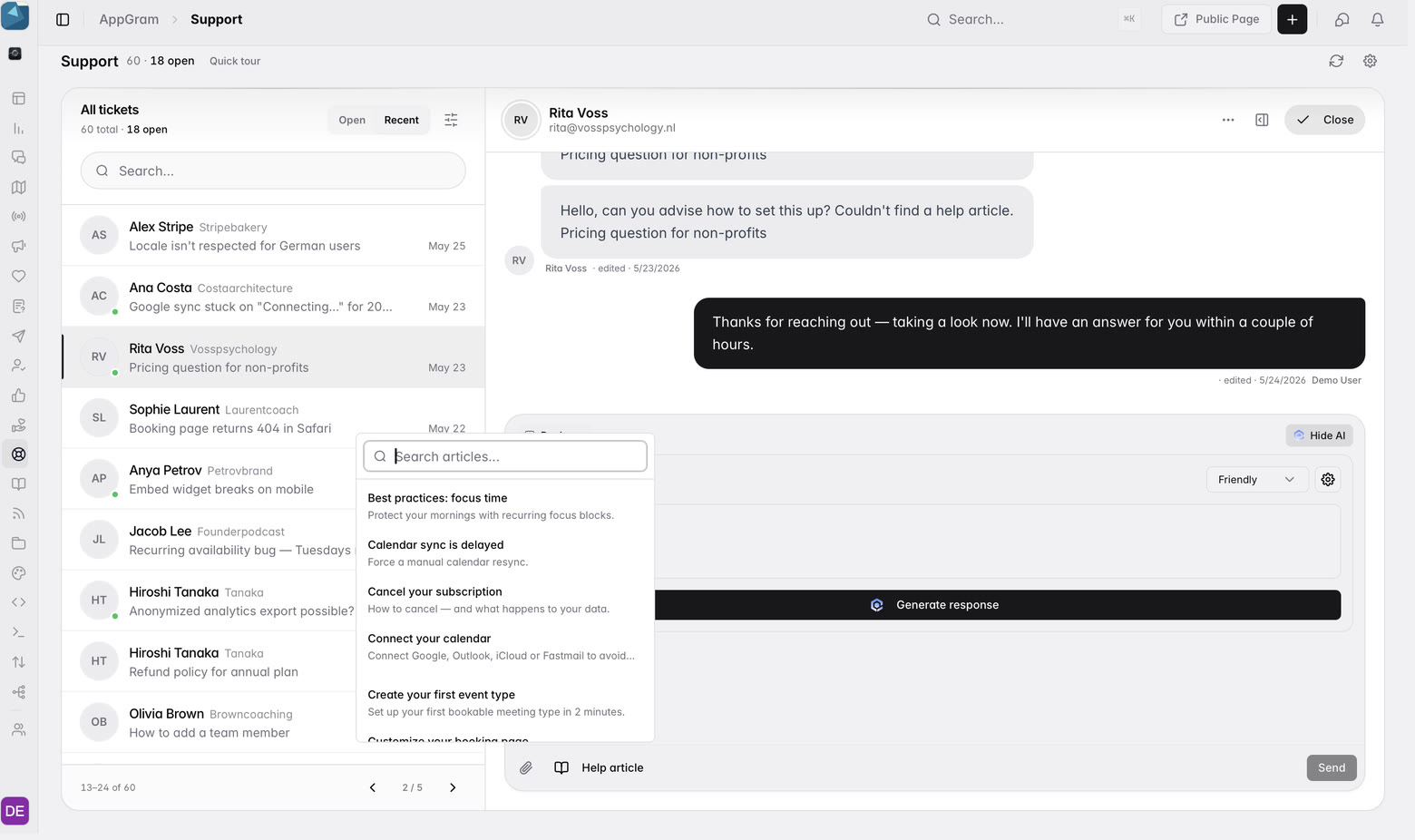
The support console: sixty tickets across the organization with eighteen open, each showing the customer and their company, the conversation open beside them, and the help center search picking the article that answers it.

Triage

Status, priority, and the person behind it.

Every ticket carries where it stands and how much it matters, and opening one opens the customer with it — so the person asking is not a name and an email address but everything they have already said to you.

  • Status, priority and category on every ticket, with the message count and ticket id
  • Internal notes on the thread, invisible to the customer
  • Joined to the customer record — plan, tier, location and their ticket history
  • Ticket closed fires an automation trigger you can build on
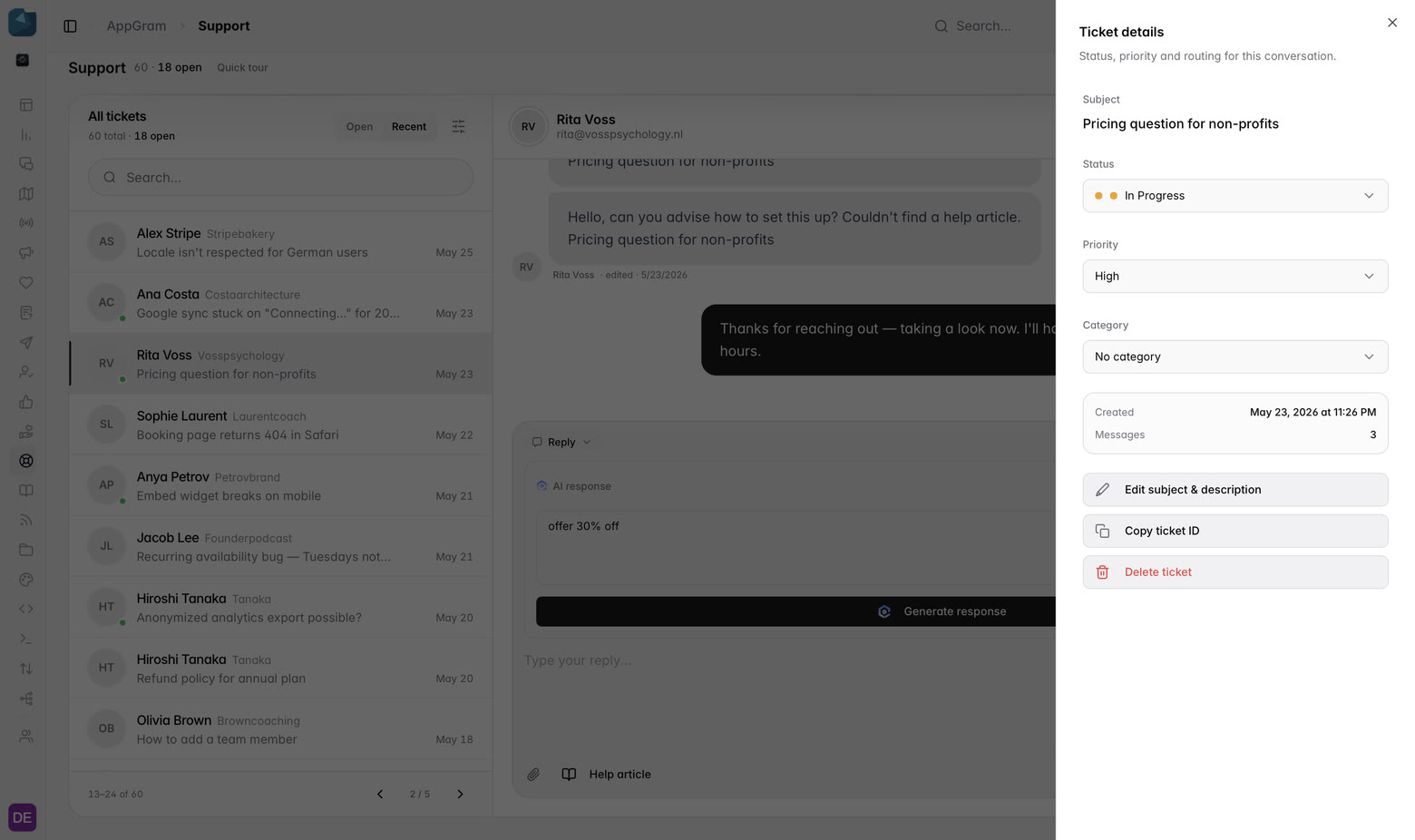
The ticket details drawer: status In Progress, priority High, a category selector, when it was created and how many messages it holds, over actions to edit the subject, copy the ticket id or delete it.

Answer

A draft that read the ticket.

Generate response writes the reply from the ticket and what is already in your help center, in the tone you picked. It is a draft in the composer, not a send — edit it, or throw it away and write your own.

  • Tone chosen per reply, not set once and forgotten
  • The draft lands in the composer; nothing leaves until you press Send
  • Search the help center without leaving the reply and attach what answers it
  • The attached article travels with the reply as suggested reading
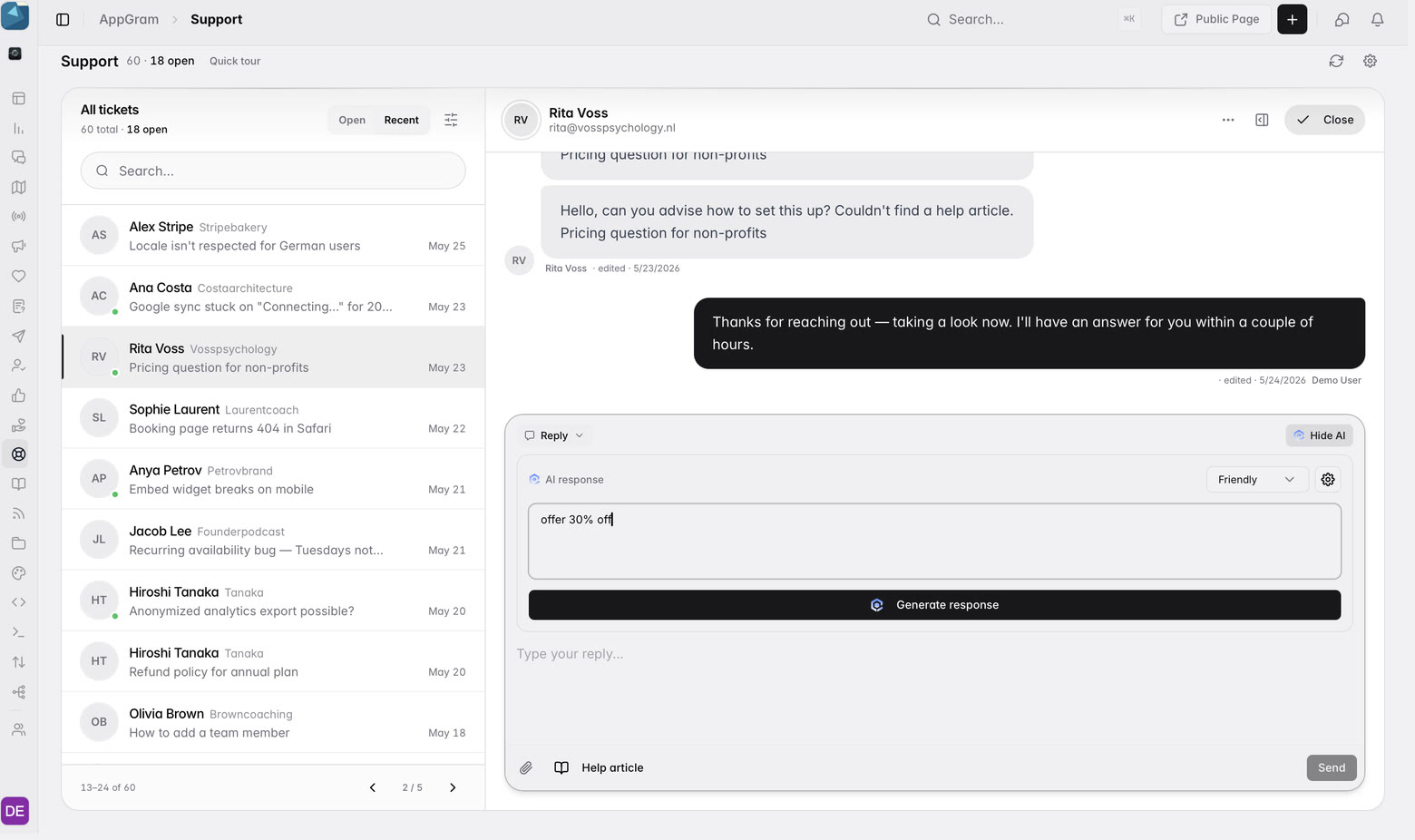
The reply composer with an AI response block, a tone selector set to Friendly, an instruction typed into it, and a Generate response button under the thread it is answering.

Set the rules once

Draft only, or answer on its own.

What the assistant is allowed to do is a project setting, not a decision an agent makes per ticket. Leave it on draft and a person always reads it first, or let it reply the moment a ticket lands — with the same persona, sign-off and guardrails either way.

  • Draft only, so nothing reaches a customer unread — or auto-reply on submission
  • Persona, sign-off, tone, length, format and language, set once per project
  • Guardrails in plain language: "Never promise refunds. Escalate billing to a human."
  • Grounded in your help center, and told to ask rather than guess when the ticket is thin
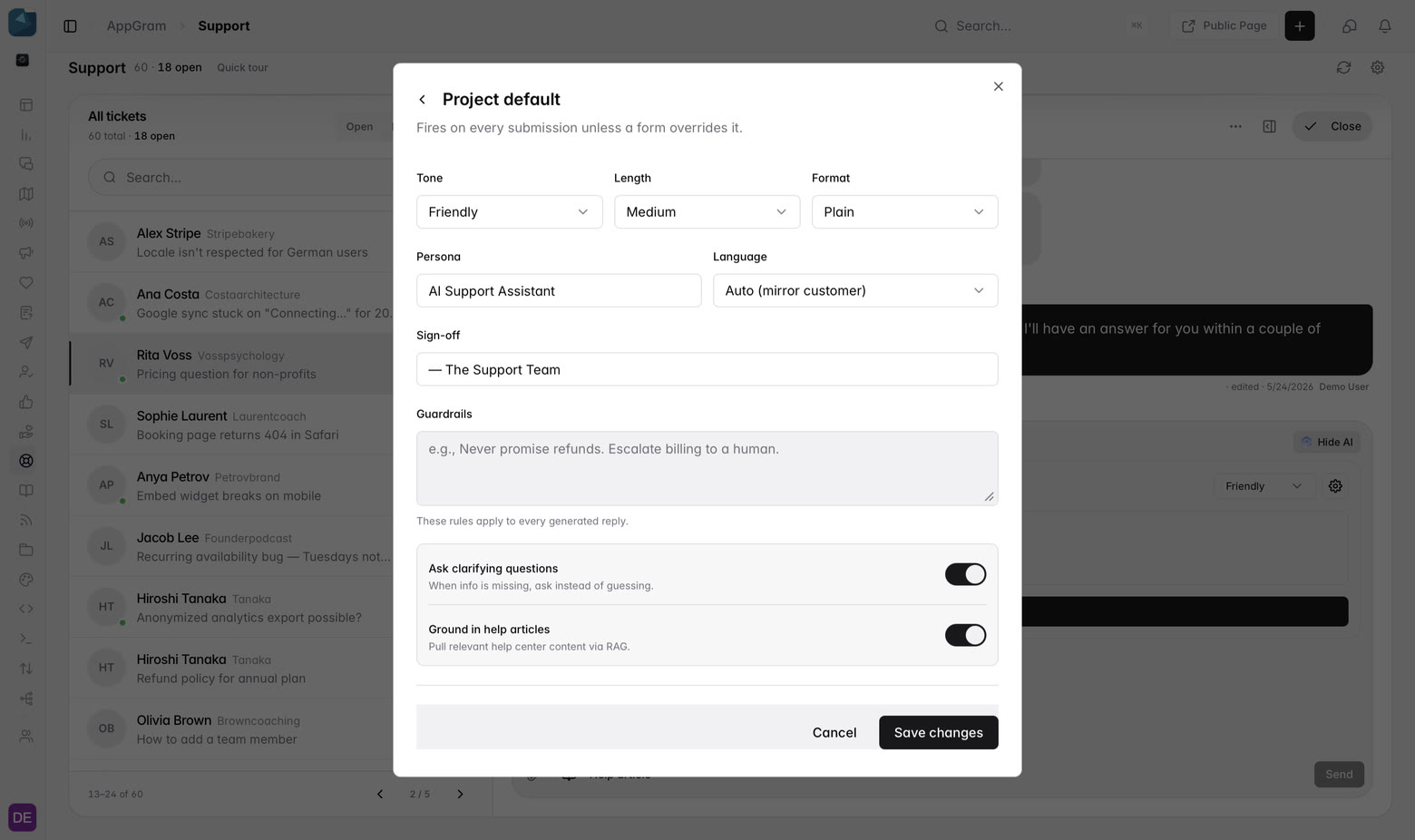
The project default panel for AI replies: a draft-only or auto-reply mode, tone, length, format, persona, language and sign-off, a guardrails box, and toggles for asking clarifying questions and grounding answers in help articles.

Close the loop

The answer arrives with the article attached.

The customer reads the reply in the thread they opened, with the help article under it as suggested reading. The next person with the same problem finds the article instead of opening a second ticket.

  • The thread belongs to the customer, on your domain — no inbox to dig through
  • The referenced article travels with the reply as suggested reading
  • Questions that keep coming back are a gap in the help center, and it shows
  • Ticket closed is an event, so CSAT can fire on it
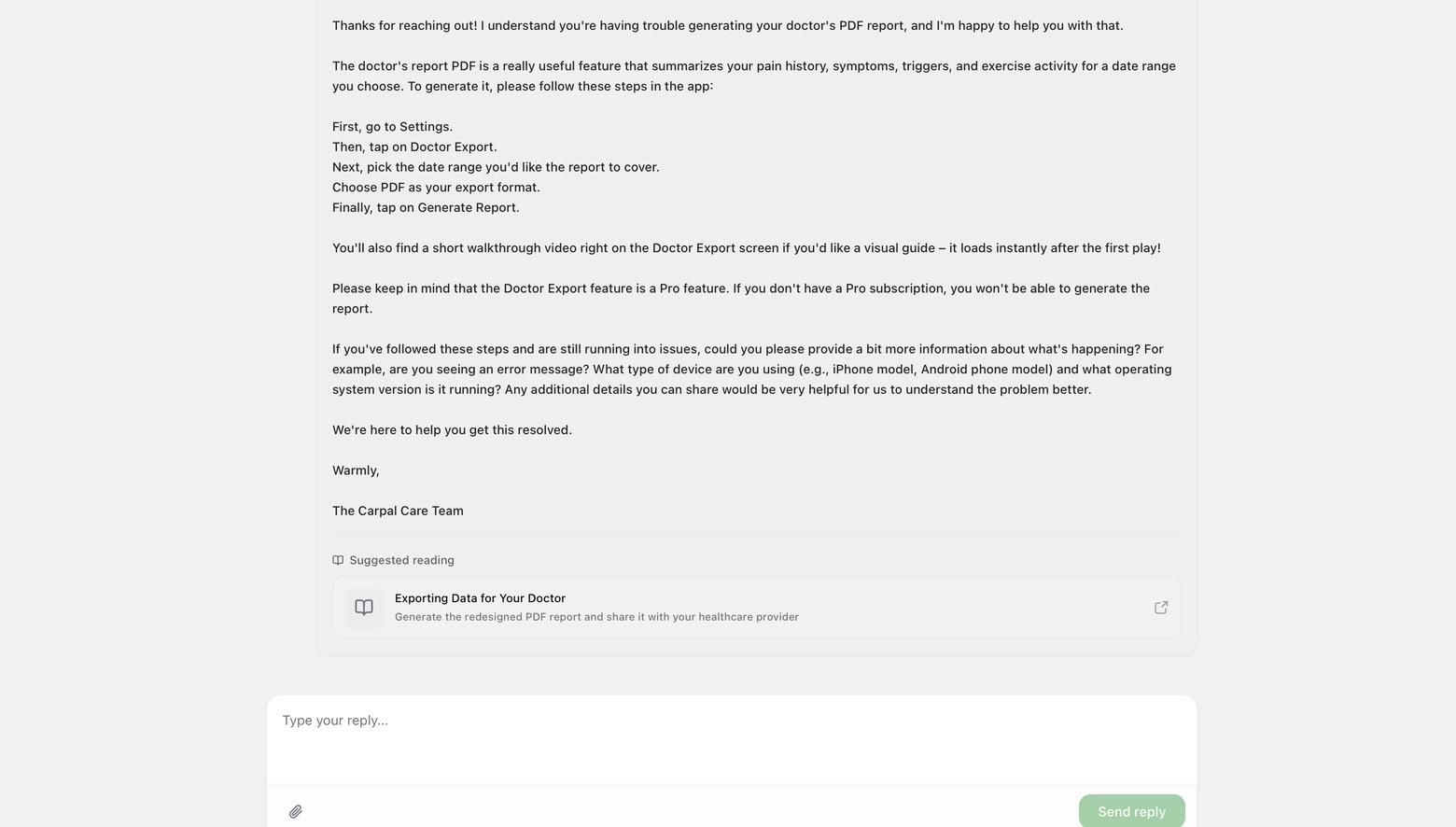
The customer side of the same thread: the full reply, a Suggested reading card linking the article Exporting Data for Your Doctor, and a box to reply again.

Who uses it

What teams actually do with Support Tickets.

For support leads

Stop paying for a second inbox

Forward the address you already publish and keep it. The portal, the console and the help center are the same product as the roadmap your customers already read — one vendor, one bill, one customer record under all of it.

For product managers

See what support has been absorbing

Categories and priorities show what support has been absorbing, and an automation can open a feature request from a closed ticket so the pattern reaches the board instead of dying in the queue.

For founders

Answer well before you have an agent

Set the persona, the sign-off and a line of guardrails once. The draft does the first pass out of your help center and you read it before it goes — support that reads like a team, run by whoever is around.

For teams with several products

One queue instead of one per product

Every project in the organization arrives in the same inbox, so nobody is switching workspaces to find out whether anything came in. The ticket still knows which product it belongs to.

Connected

Support Tickets plugs into everything else you run.

Every module writes to the same customer graph, so data captured here shows up wherever it is useful — no connectors to authorize, no sync to babysit.

See all integrations →

FAQ

What teams ask about Support Tickets.

Can we keep the support address we already publish?

Yes, and you should. AppGram gives each project a unique inbound address; you add one forwarding rule from the inbox you already use and the mail arrives as tickets. Replies thread onto the right ticket on their own, and Developer → Logs → Inbound Emails shows what each message did — opened a ticket, threaded onto one, or was a provider confirmation. Nothing is migrated and nothing changes for the people writing to you.

What address do replies come from?

AppGram's shared platform address to begin with, so email works the moment you forward. When you want it to come from you, connect SendGrid, Resend or plain SMTP — Gmail app passwords, Mailgun, Postmark and self-hosted all work — under Settings → Organization → Communications, set the sender name and address, send a test, and switch provider later if you change your mind.

We run several products. Is that several inboxes?

No. Every project in the organization lands in the same queue, so one team answers for all of them without switching workspaces, and a quiet product does not need somebody remembering to go and check it. Each ticket still carries the project it came from.

Do customers need an account to open a ticket?

No. They give an email address, a subject and a description, and get a secure link back to the thread — enough to add attachments and reply. If they are already signed in to your product you can pass the customer id instead, and the ticket lands on the record they already have.

Where does the drafted reply come from?

The ticket and your help center. It writes into the composer in the tone you picked and stops there — nothing is sent until you press Send, and you can edit every word of it or delete it and answer in your own.

Can we attach a help article to a reply?

Yes. Search the help center from inside the composer and the article travels with the reply as suggested reading, so the customer gets the answer and the page it came from in the same message.

What happens when a ticket is really a feature request?

One click converts it. The thread stays with the customer and the request goes onto the wishboard, so it collects votes like any other and the person who raised it is told when it ships.

Can the assistant reply on its own?

Only if you tell it to. The project default is draft only — it writes into the composer and waits for a person. Switch the mode to auto-reply and it answers on submission instead. Either way it uses the persona, sign-off, tone, length, format and language set on the project, obeys the guardrails you wrote in plain language, is grounded in your help center, and can be told to ask a clarifying question rather than guess when a ticket is too thin to answer.

How do we handle triage and escalation?

Through the automation catalogue. AI Ticket Triage and Advanced Triage with SLA Escalation ship as blueprints you install and switch on — the escalation is a timer and a reminder inside a flow you can see and change, rather than a policy engine you configure blind.

Can we ask for a CSAT score when a ticket closes?

Yes. Ticket closed is an event like any other, and a rating survey fired on it arrives with the ticket, the agent and the customer attached — so a low score is a conversation rather than a number in a report.

Get started

Stop paying for six tools. Run product ops from one.

Everything you were bolting together — feedback, roadmap, changelog, help, support, status, forms — in a single workspace with one API and one bill.

Cancel anytime. Yours to test on real customers.

Talk to sales

Tell us what you're running today and we'll map it onto AppGram.

A real human replies within one business day.