HomeCustomers

Get started

Everyone who touched yourportal, on one list.

Voters, survey respondents and people who only ever read the changelog land in the same directory, sorted into three tiers — anonymous, self-identified, verified. Open one and you get where they are, when they were last here, what support they have had, the attributes you set yourself, and the license keys bound to them.

Book a demo →

Private beta

Rolling out to organizations one at a time — request access to get on the list.

Three tiers

Anonymous, self-identified and verified — a visitor counts before they ever give you a name.

One record

Location, first and last seen, support history and your own attributes, in one panel.

Keys attached

Mint a license key against a person and it stays bound to their record.

Arrive

A visitor is a record before they are a customer.

Most directories start when someone signs up, which means everything they did before that is lost. Here the record opens on first contact and carries an anonymous ID. Vote on a request, answer a survey, read a release — it all lands on that ID. When they eventually give you an email, the history they arrived with is already theirs.

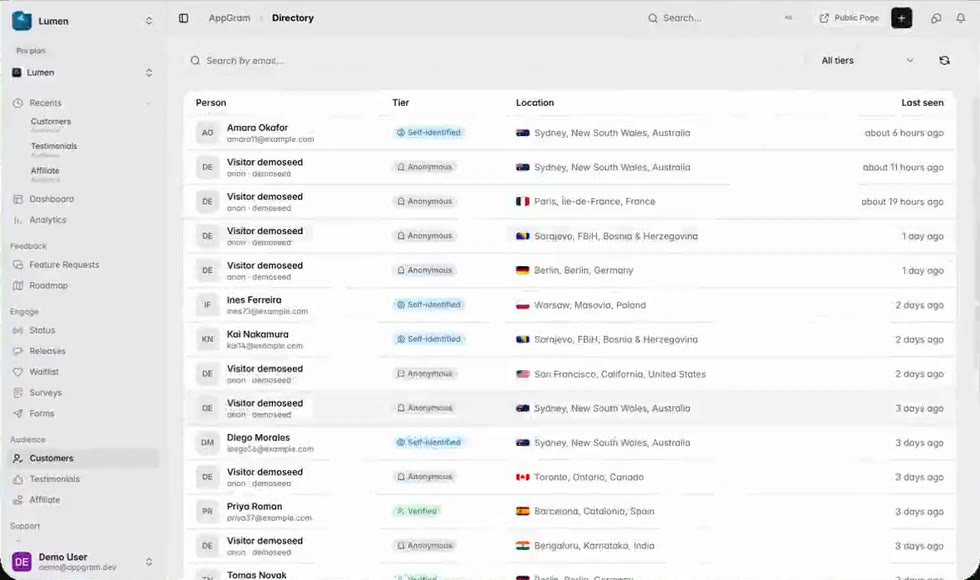
  • Anonymous, self-identified and verified, held as three explicit tiers
  • An anonymous ID that persists until the person identifies themselves
  • Location resolved to city, region and country
  • First seen and last seen on every record, however they arrived
A customer directory listing people by tier — self-identified, anonymous and verified — each row carrying the city, region and country they were last seen from and how long ago that was.

Find

Search by email, or read the room by tier.

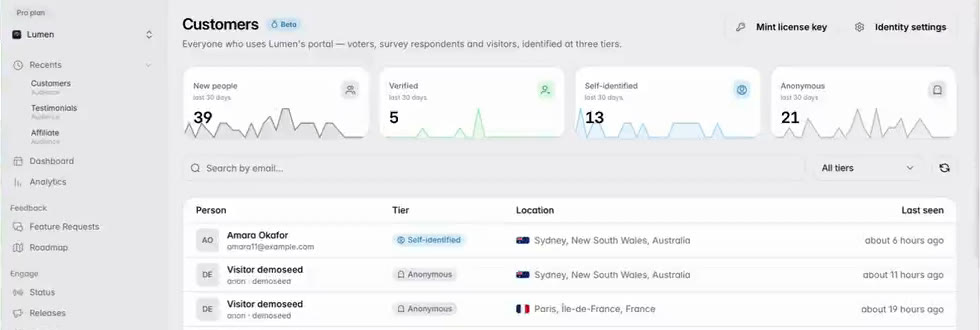
The directory is a list you can actually work: search on an email when you know who you are after, filter to a tier when you do not. Four counters across the top track the last thirty days, so growth in anonymous readers and growth in verified customers are two different numbers rather than one blurred total.

  • Search by email across the whole directory
  • Filter to any one tier, or show all of them together
  • Four thirty-day counters, one per tier plus the total
  • Open any counter for a chart over 7, 30 or 90 days, by day, week or month
The top of the customer directory: four thirty-day counters for new people, verified, self-identified and anonymous, a search field that takes an email, a tier filter set to all tiers, and the first rows of the list underneath with their tier badges.

Attach

Your own fields, on someone else's record.

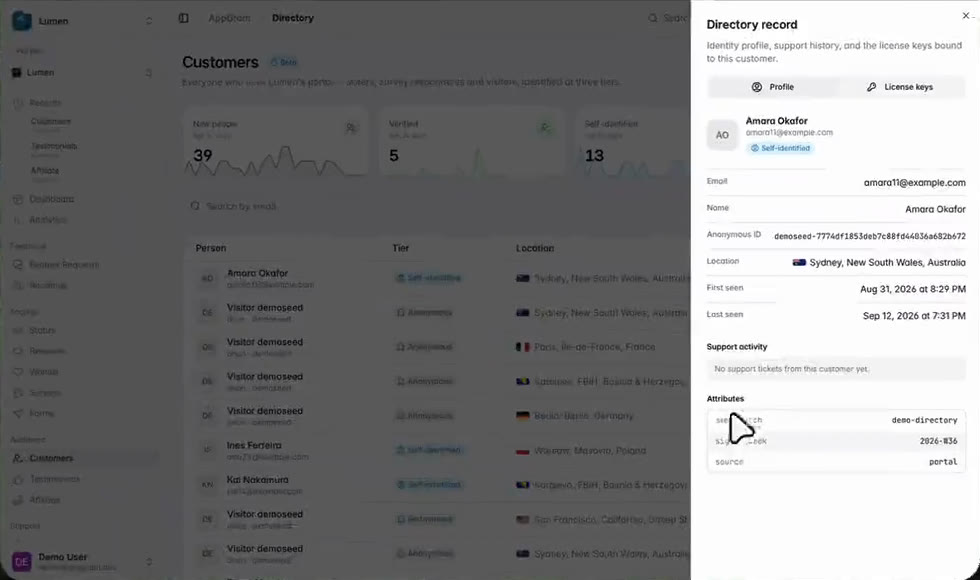
A directory that only holds what AppGram collected is half a directory. Attributes are yours to set — the plan they are on, the week they signed up, where they came from — and they sit on the record next to the support this person has had from you, so the context is in one panel rather than three tabs.

  • Arbitrary key and value attributes, set per customer
  • Support activity from this person listed on the same record
  • Written through the API, so your own systems can keep it current
  • Identity settings control what the portal asks for and when
A customer record open beside the directory, showing email, name, the anonymous ID they arrived with, location, first and last seen, a support activity panel, and custom attributes for signup week and source.

License

A key that knows who it belongs to.

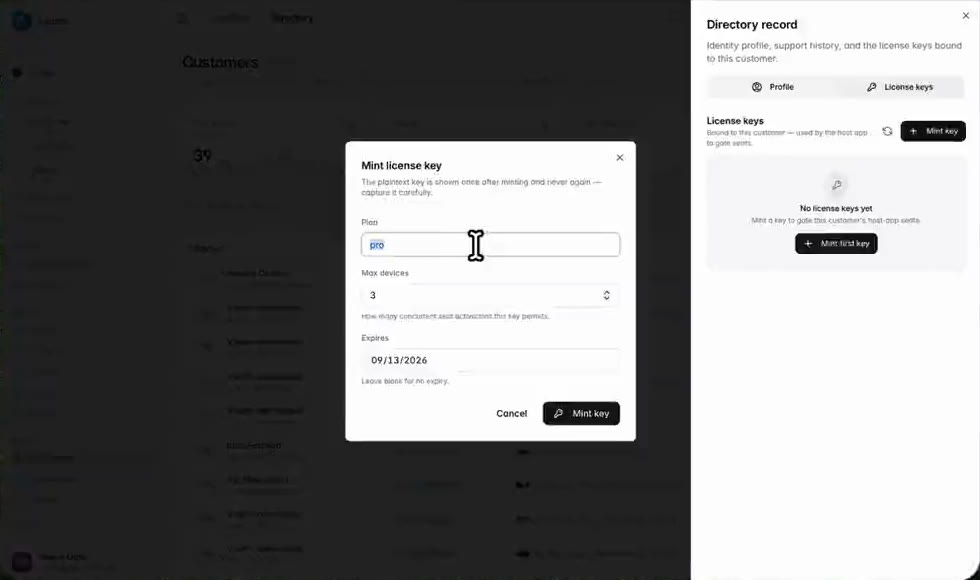
Mint a license key against a person and it is bound to that record, not floating in a spreadsheet. When they write in about it the key is already on the profile the ticket opens beside, which turns the usual round of "can you confirm your order email" into something you can answer on the first reply.

  • Mint against a person from their record, with a plan and a device cap
  • Set an expiry, or leave it blank for a key that does not lapse
  • The plaintext key is shown once at mint time and never again
  • Keys live under their own tab on the customer, not in a spreadsheet
The mint license key dialog over a customer record, asking for a plan, a maximum number of devices and an expiry date, and warning that the plaintext key is shown once after minting and never again.

Who uses it

What teams actually do with Customers.

For support

Know who you are answering

The ticket opens with the person beside it — where they are, how long they have been around, what they have asked for before, and the key they bought. No hunting through a second system to find out whether this is day one or year three.


For product

Tell readers from customers

The tier split says whether your portal is mostly anonymous readers or people your app has vouched for — two very different mandates, and one number would hide the difference.

For growth

Watch identification, not just traffic

The counters separate people who showed up from people who volunteered an email and people your own backend vouched for with a signed token. That is the funnel your portal actually runs, and it moves for reasons you can act on.

Connected

Customers plugs into everything else you run.

Every module writes to the same customer graph, so data captured here shows up wherever it is useful — no connectors to authorize, no sync to babysit.

See all integrations →

FAQ

What teams ask about Customers.

What are the three tiers?

Anonymous is someone who has used the portal without telling you who they are; they still get a record and an anonymous ID. Self-identified means they typed an email into the portal themselves. Verified means your own backend vouched for them — you sign a short identity token with your project secret, and the record carries the trusted id, plan and attributes that came with it. The tier is shown on every row and you can filter the directory down to any one of them.

What happens to an anonymous record when the person identifies themselves?

It becomes their record. The anonymous ID is what everything was attached to in the first place, so the votes, survey answers and visits from before they gave you an email stay on the same profile rather than starting again from zero.

Can I put my own data on a customer?

Yes — attributes are arbitrary key and value pairs on the record, set by you or written through the API so your own systems can keep them current. They render on the profile alongside the fields AppGram fills in itself.

What are license keys doing here?

A key can be minted against a person from the directory and stays bound to that record, listed under its own tab on the profile. It means the customer, their support history and the key they are writing in about are all in one place.

Get started

Stop paying for six tools. Run product ops from one.

Everything you were bolting together — feedback, roadmap, changelog, help, support, status, forms — in a single workspace with one API and one bill.

Cancel anytime. Yours to test on real customers.

Talk to sales

Tell us what you're running today and we'll map it onto AppGram.

A real human replies within one business day.