HomeTestimonials

Get started

Collect proof with thepaperwork already handled.

Scan your surveys, resolved tickets and shipped-request upvoters for people who already said something good. Ask them with a link that lets them edit their own quote before they agree, then publish to a wall on your own domain.

Book a demo →

Already said it

Candidates found in surveys, support threads and shipped wishes.

Consent on record

A link the author approves before the quote is publishable.

Scored, not dumped

Each candidate carries how quotable it is, so the best surface.

Spot

The quote already exists. You just have not found it.

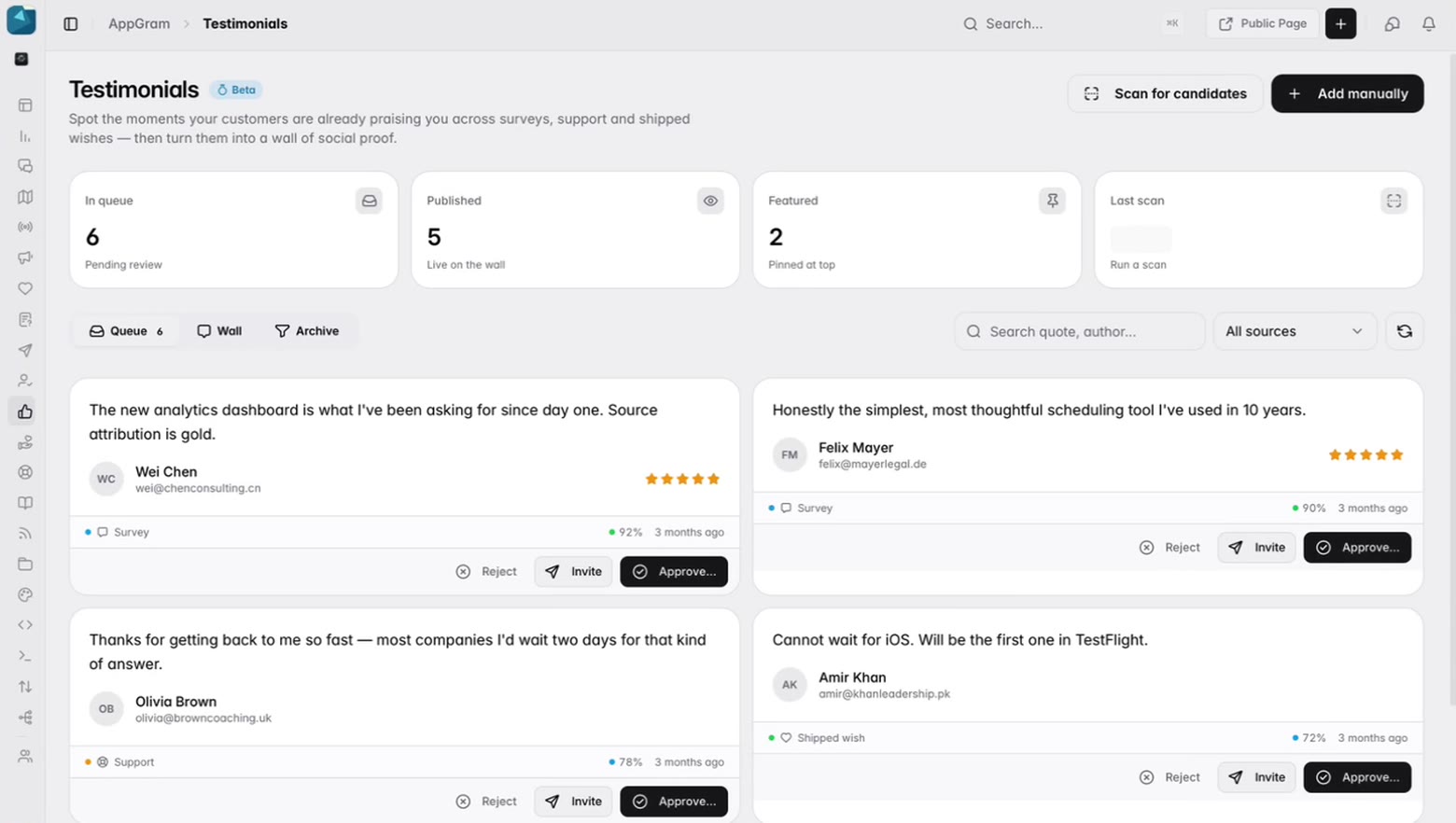
People praise you in places nobody reads back — an answer at the end of a survey, a line in a support thread, a comment under a request that finally shipped. The queue goes looking through those, scores how quotable each one is, and puts them in front of you with the source still attached.

  • Candidates surfaced from surveys, support conversations and shipped wishes
  • A confidence score on each, so the strongest rise to the top
  • Scan whenever you want, and see when the last one ran
  • Add one from outside the product too — a sales call, a podcast, a post
Six candidate quotes waiting for review, each showing the customer who said it, where it was said — a survey, a support thread, a shipped wish — how confident the match is, and buttons to reject it, ask the author, or approve it.

Ask

Nobody gets quoted without saying yes.

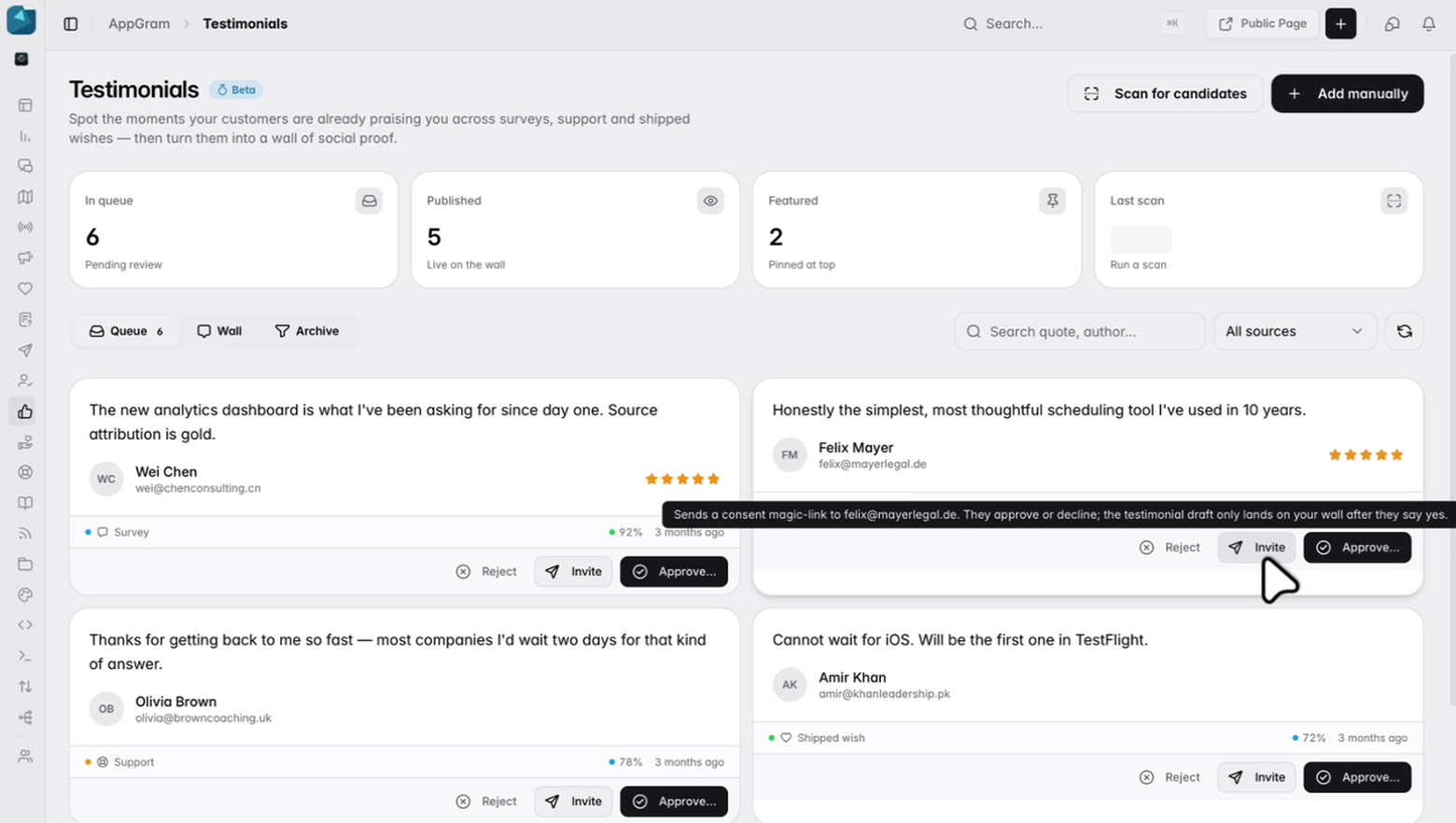
Send an invite and the author gets a consent link of their own. They approve or they decline, and the draft only reaches your wall if they approve. That is the difference between a quote you can put on a landing page and one you are hoping nobody objects to.

  • A consent link goes to the author, who approves or declines it
  • Invites carry an expiry, and the queue shows which are outstanding
  • Record consent yourself instead, when you already have it in writing
  • Published quotes keep the source they came from
The invite action on a candidate explaining itself: a consent link is sent to the author’s address, they approve or decline, and the draft only lands on the wall once they have said yes.

Approve

Edit it before it goes up.

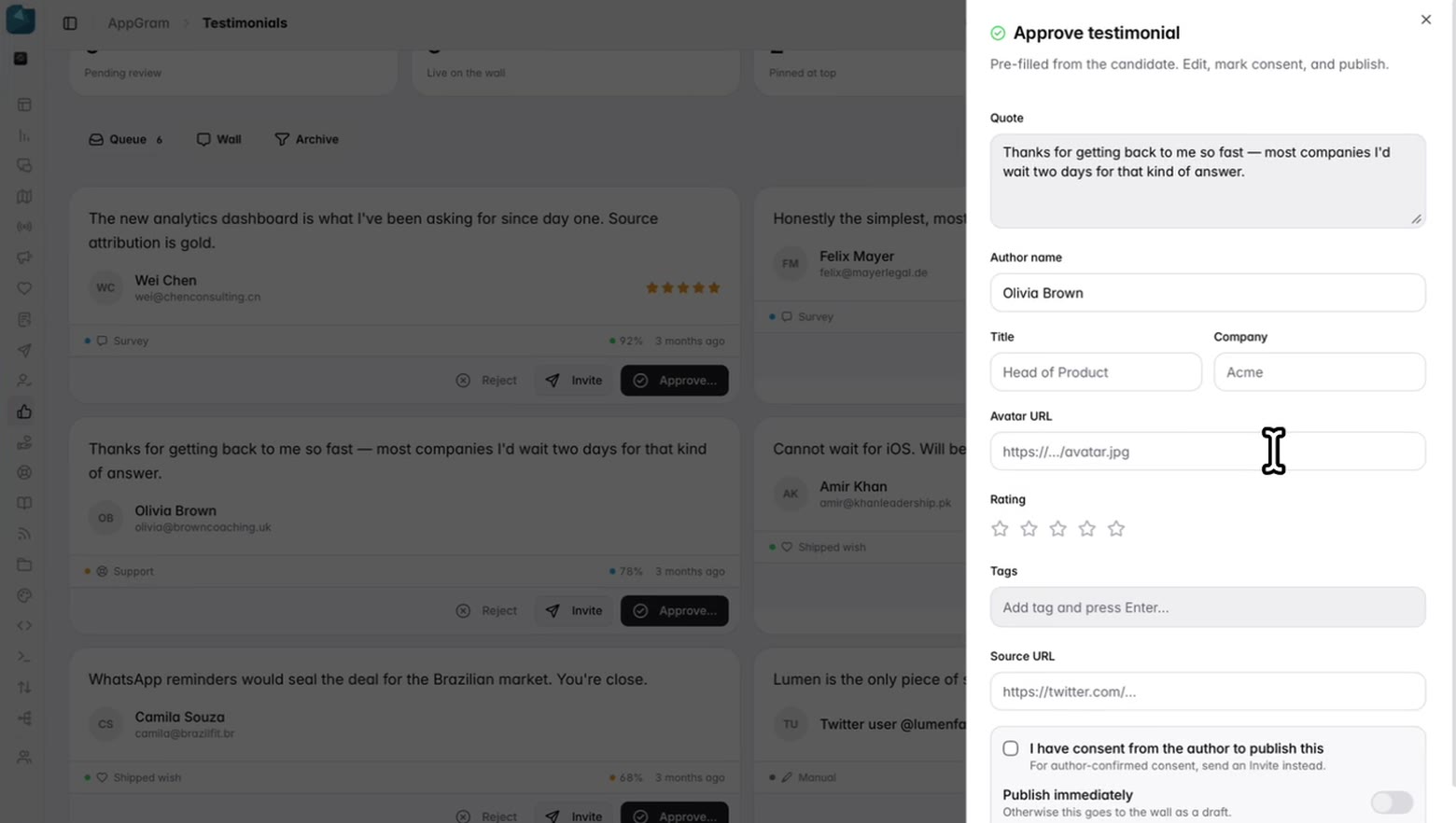
Approving opens the quote pre-filled and editable — trim the sentence that rambles, add the role and the company that make it land, tag it so it can be found again. Then publish it, or leave it as a draft until you are ready.

  • Quote, author, title, company and avatar, all editable before it publishes
  • A rating and tags on every one
  • Publish immediately, or hold it back as a draft
  • Reject what is not worth using; an archive sits beside the queue
A candidate opened for approval: the quote pre-filled and editable beside fields for the author’s title, company and avatar, a rating and tags, and below them a consent checkbox and a switch deciding whether it publishes now or waits as a draft.

Publish

A wall of the ones you chose.

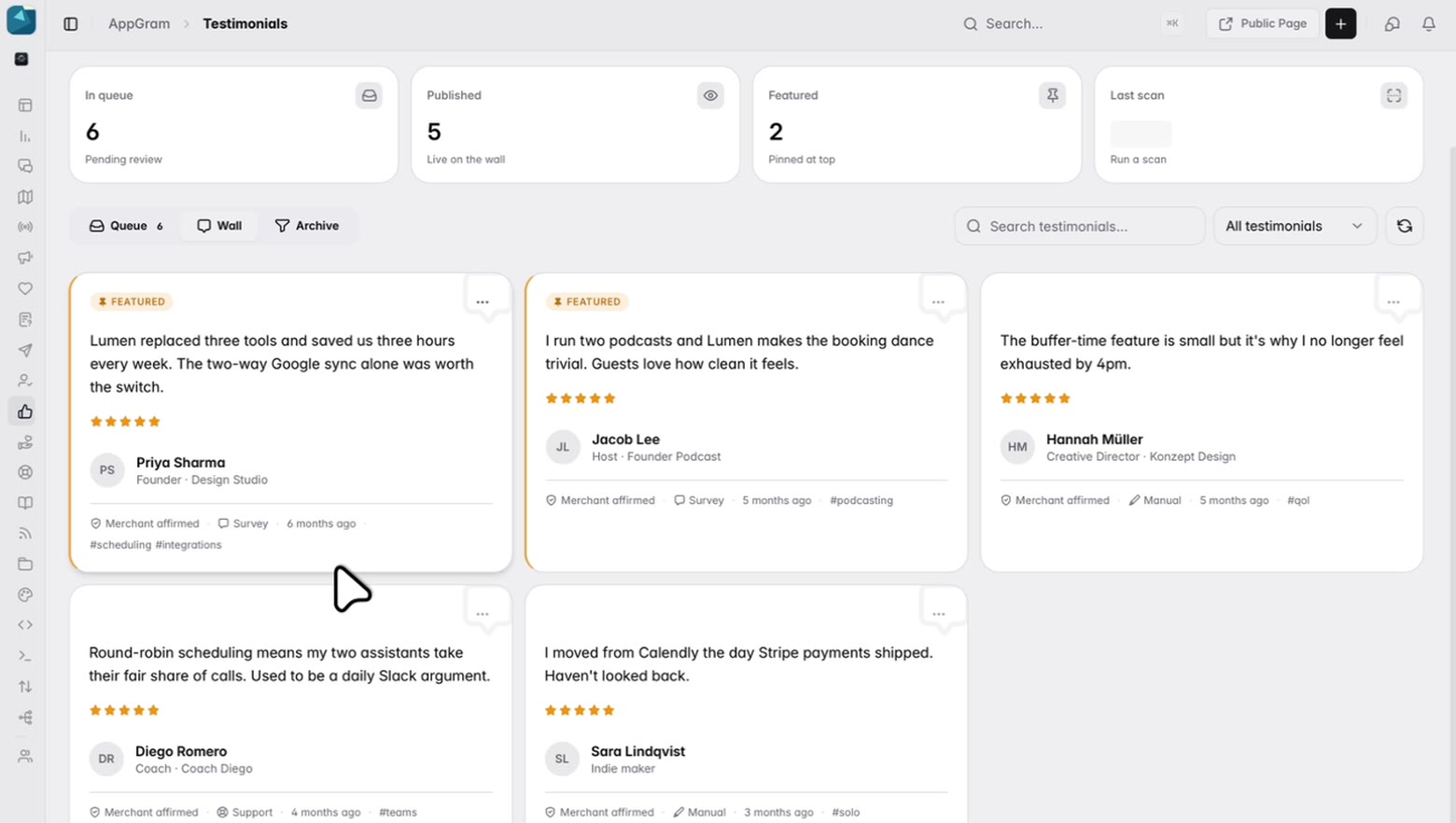
The approved quotes sit together with the author, their role, the rating and the tags they were filed under, and the ones you pin lead. It is a page that grows rather than a folder of screenshots somebody has to find again next quarter.

  • Feature the strongest and they pin to the top of the wall
  • Author, role and company on every card
  • Tagged, searchable and filterable as the wall fills up
  • A public page for it, alongside the rest of your portal
The published wall: five approved quotes with their authors, roles and ratings, tagged by what they are about, two of them pinned to the front and marked as featured.

Who uses it

What teams actually do with Testimonials.

For marketing

Stop screenshotting Slack

The praise is already sitting in your surveys and your support inbox. It comes out as a card with the author and the source on it, not a cropped image somebody has to go hunting for the next time a landing page needs one.


For founders

Proof you are actually allowed to use

The author clicked a link and said yes. When somebody asks where a quote came from or whether you can publish it, the answer is on the record instead of in your memory.

For support leads

The thank-you that turns into something

A customer telling an agent they got a fast answer is a testimonial nobody was ever going to write down. Now it surfaces on its own, and asking them takes one click.

Connected

Testimonials plugs into everything else you run.

Every module writes to the same customer graph, so data captured here shows up wherever it is useful — no connectors to authorize, no sync to babysit.

See all integrations →

FAQ

What teams ask about Testimonials.

Where do the candidates come from?

From what your customers have already said elsewhere in AppGram — answers at the end of surveys, lines in support conversations, and comments on requests that shipped. Each candidate arrives carrying its source and a score for how quotable it is, and you can run a scan whenever you like rather than waiting for one.

How is consent captured?

By asking. Send an invite and the author receives a consent link; they approve or decline, and the draft only lands on the wall if they approve. Invites carry an expiry and the queue shows which are still outstanding. If you already have consent in writing, you can record that yourself instead of sending one.

Can we edit a quote before publishing it?

Yes. Approving opens it pre-filled — the quote itself, the author, their title and company, an avatar, a rating and tags are all editable — and you decide whether it goes live straight away or waits on the wall as a draft.

Can we add a quote from somewhere else?

Yes. Add one by hand with the quote, the author and a link back to where they said it — a sales call, a podcast, a post. It goes through the same consent and publishing steps as one the scan turned up.

Which testimonials show first?

The ones you feature. Featured quotes pin to the top of the wall and are counted separately from the rest, so the two you most want read are the two anyone sees first.

What happens to the ones we do not publish?

Reject them and they leave the queue. There is an archive beside the queue and the wall for the ones you would rather keep than delete.

Get started

Stop paying for six tools. Run product ops from one.

Everything you were bolting together — feedback, roadmap, changelog, help, support, status, forms — in a single workspace with one API and one bill.

Cancel anytime. Yours to test on real customers.

Talk to sales

Tell us what you're running today and we'll map it onto AppGram.

A real human replies within one business day.